Set Up Your Facebook Marketplace Auto-Reply Chatbot
Automate Facebook Marketplace messages in 7 simple steps - No coding required
Join 1000+ sellers saving 10+ hours per week with automated buyer responses
See How It Works
Step 1: Sign Up
Sign up for an account to unlock all features and get the most out of our service. There are some free credits and no credit cards needed.
Step 2: Install Extension
Download and install the extension from the Chrome Web Store.
Step 3: Import Your Listings (Optional)
Optional — recommended if you sell different products, so the AI can answer about each specific item. Selling one product? Skip this; your AI already replies from your Business Info.
How to import
Import all your listings in a few clicks:
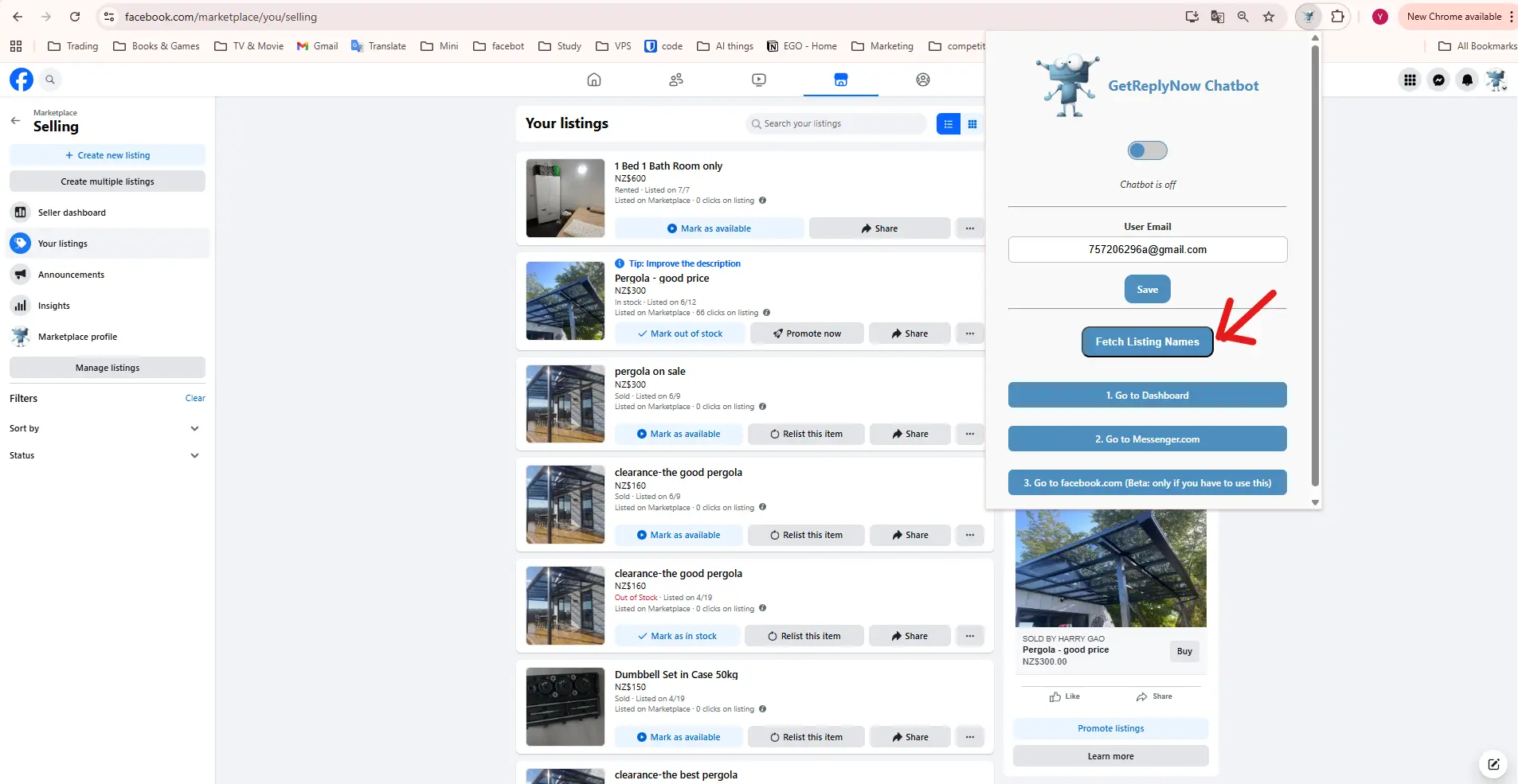
- Open https://www.facebook.com/marketplace/you/selling
- Click "Import Listings" in the extension
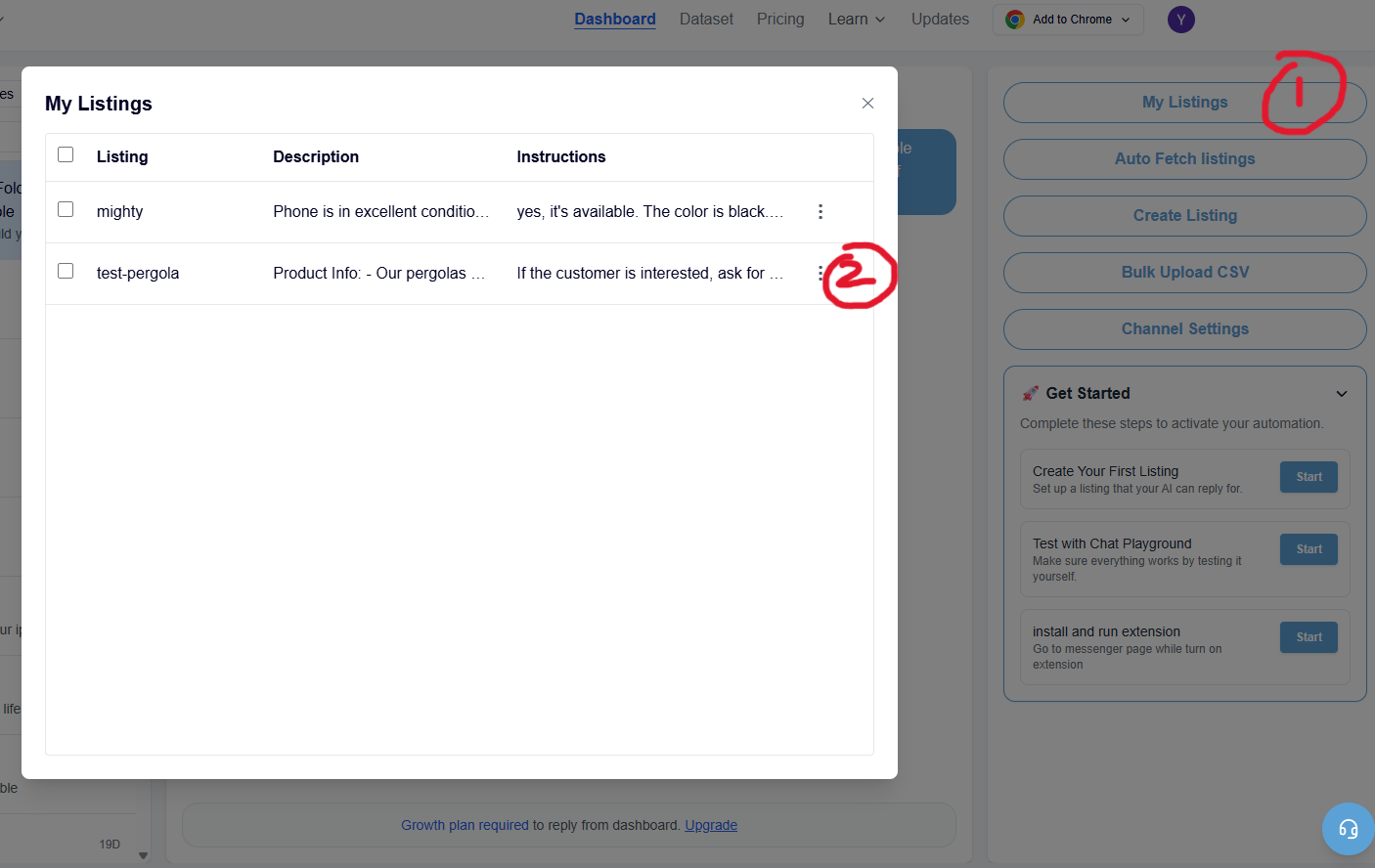
- Your listings are imported with their descriptions
🏡 Selling real estate or vehicles? Always use this import — Facebook gives those listings identical default titles, and importing links each one by its item ID so the AI always answers about the exact property or car. See how it works
Step 4: Set Up Your AI
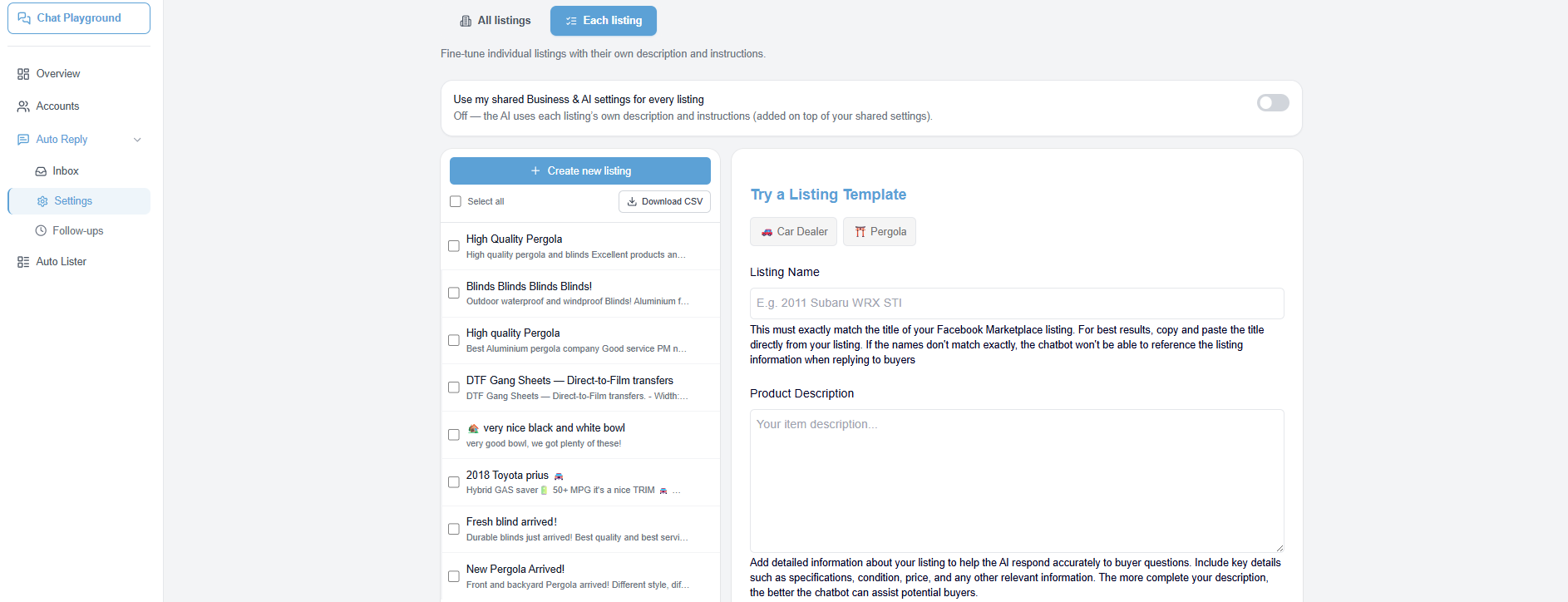
In Settings, add your AI Assistant instructions and Business Info. These apply to every listing, so you set them once.
Business Info is shared detail about your business — hours, location, payment, pickup, policies. AI Assistant tells the AI how to talk and what to do — ask for a phone number, book a call, or send buyers to your website. Want listing-specific detail? Open any listing under Each listing to add its own description on top.
Step 5: Turn On AI Follow-Ups (Optional)
Follow-Ups re-engage buyers who went quiet — and the AI writes each one for you, tailored to the conversation and in the buyer's language. Click Follow-ups in the sidebar, set one or more delays (for example, 24 hours and 3 days), and for each one write a short instruction — what the AI should do, not the exact words. You set this up once and every listing uses it. Add a "Don't follow up when…" rule to keep the AI quiet when a nudge would be awkward (for example, the buyer already shared their phone number). The bot only nudges buyers who've gone silent, and stops the moment they reply.
Why it matters: Most Facebook Marketplace buyers go quiet after one or two messages. A single follow-up can recover a meaningful percentage of those conversations — and because the AI writes each one from the actual conversation, it lands far better than a canned message, with no extra work from you.
This step is optional. Your auto-reply setup works perfectly without follow-ups — add them later any time. Tip: use 🧪 Test follow-up on any inbox conversation to preview exactly what the AI would send before you go live.
Step 6: Test in Chat Playground
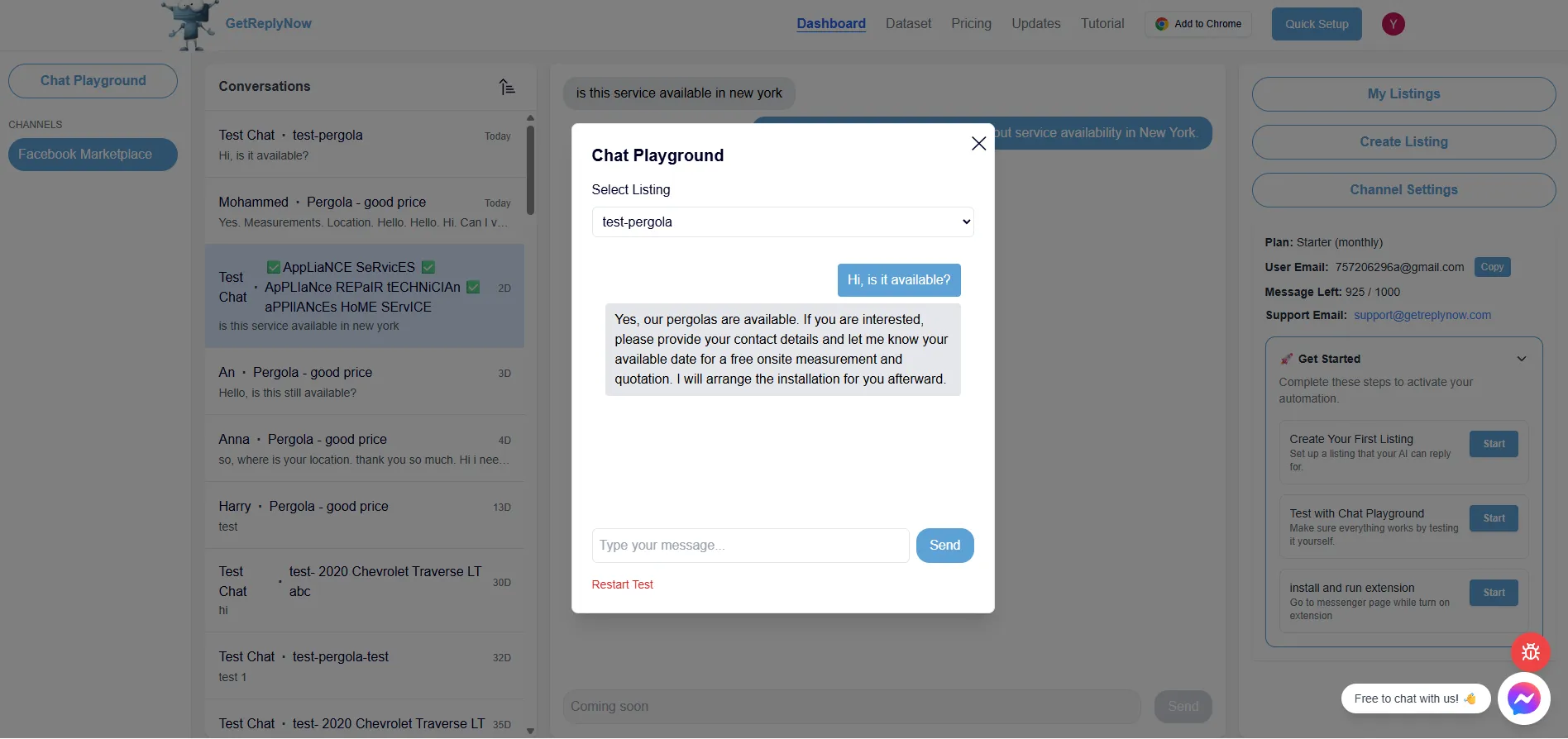
Open Chat Playground from the sidebar. Pick one of your listings and pretend to be a buyer. Ask the questions you hear most — "Is this still available?", "What's your lowest price?", "Can I pick up today?". Nothing is sent to Facebook from here, so it's completely safe to experiment.
Before you go live, check
- The bot's tone matches how you'd reply yourself
- Price, availability and pickup details are correct
- It doesn't promise anything you can't deliver
- Any Smart Conditions you set up trigger as expected
Step 7: Open the Extension & Go Live
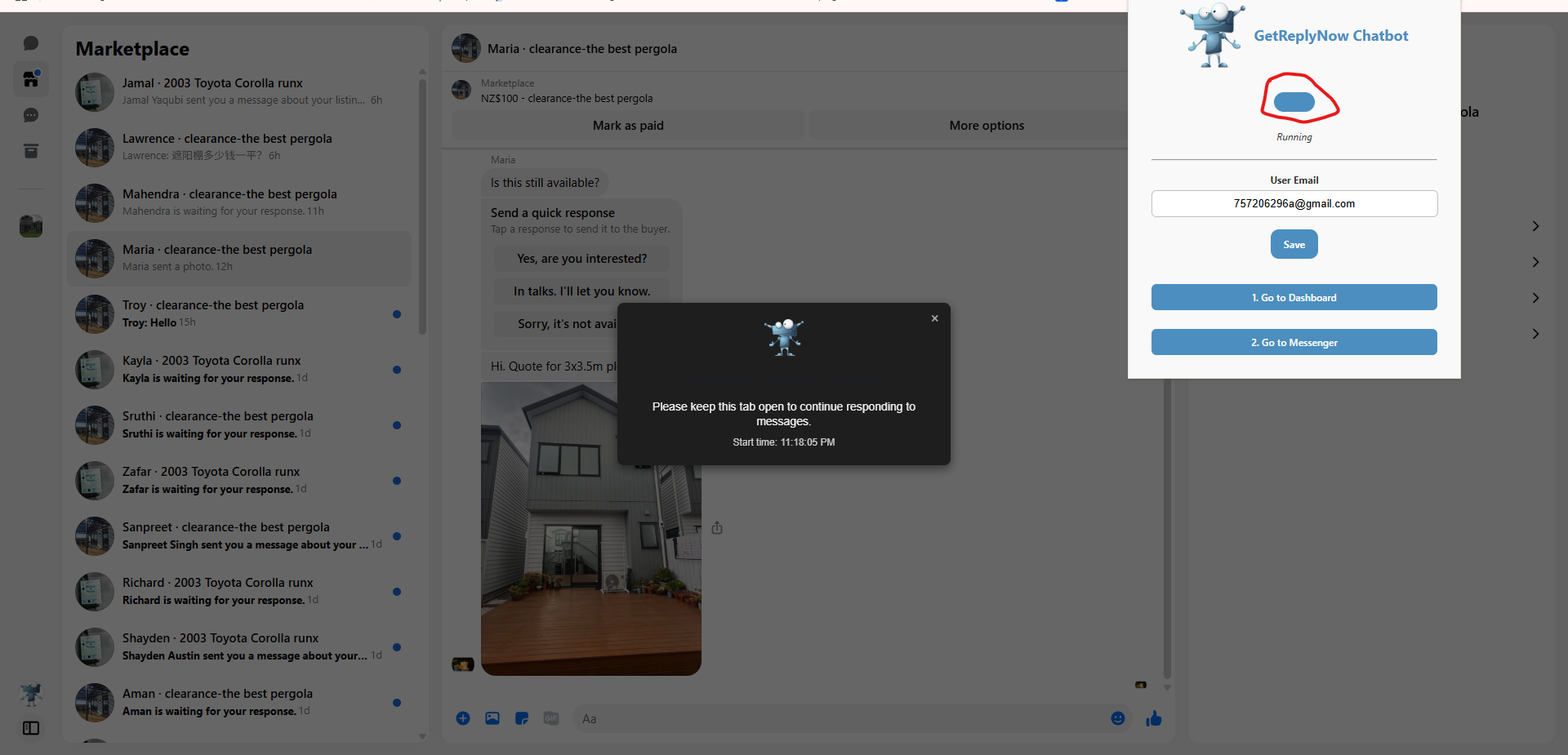
Open the extension, login your email, then click 'Go to Facebook Messages'.

Enable the Extension
Enable the extension, wait a few seconds until the widget pops up. Keep this open; you can open new windows without affecting functionality.
Final Step: Need Help?
No matter your plan, contact us at support@getreplynow.com – we're here to help!
Frequently Asked Questions
How long does Facebook Marketplace auto reply setup take?
Most users complete setup in under 1 Minute. Just install our Chrome extension and follow the steps above.
Is Facebook Marketplace automation allowed?
Yes, our tool works as a browser extension that helps you manage messages more efficiently, similar to how Grammarly helps with writing.
Can I customize auto replies for different Facebook Marketplace listings?
Absolutely! Set global responses or create specific messages for individual listings.
Do I need technical skills to set up the auto-reply bot?
No coding required! Our user-friendly interface makes it easy for anyone to set up automated responses in minutes.
Can I try GetReplyNow for free?
Yes! We offer free credits to get started, and no credit card is required for sign-up.
Do I still need the Chrome extension if I'm using the dashboard?
Yes. The dashboard is where you configure everything - business info, listings, follow-ups, Smart Conditions - but the extension is what actually connects to Facebook Marketplace and sends replies on your behalf. You need both.
What are Smart Conditions and do I need them?
Smart Conditions let you control exactly how the bot replies in specific situations - first message, price questions, high-intent buyers, and more. They're optional and free on the free plan (with more on Growth and above). Your Business Info and AI Assistant instructions work great for most sellers on their own.
What do Follow-Ups do?
Follow-Ups automatically re-engage buyers who stopped replying. You set a delay (e.g. 24 hours) and a short instruction, and the AI writes the actual nudge for each conversation — in the buyer's language — sending it only if the buyer has gone silent. It stops the moment they reply, and you can add a "don't follow up when…" rule so it stays quiet when a nudge would be awkward. Set them up once and every listing uses them.